23 May 2026
Nano Banana on OpenRouter 2026: Pricing, Setup, API Examples

Introduction
If you're a developer who needs Nano Banana in production but doesn't want to wire up Google Cloud billing, manage IAM roles, or commit to one provider, OpenRouter is the path.
One API key, three Nano Banana model variants, transparent pay-per-call pricing, and a single SDK that also gives you Midjourney, Stable Diffusion, and dozens of other image models on the same line of code.
This guide walks through everything:
- Which Nano Banana model to pick
- Current 2026 pricing
- How to authenticate
- Working code in three languages
- Cost-saving patterns that matter at scale
If you're not yet sure what Nano Banana is, start with our primer on what is Nano Banana and our Nano Banana beginner's guide.
Otherwise, into the API.
Why Use OpenRouter Instead of Google AI Studio Direct
Four reasons developers reach for OpenRouter over the direct Google API:
1. One Key, Many Models
Nano Banana today, switch to Midjourney or Qwen Image Edit tomorrow without rewriting your auth flow.
2. No Google Cloud Billing Setup
Skip IAM, skip GCP project creation, skip enabling billing. Just a credit card and an API key.
3. Transparent Pay-Per-Call
OpenRouter pricing is exposed in their UI. The cost per call shows up in your dashboard live.
4. Fallback Routing
If Google has an outage, OpenRouter can route to an alternative endpoint for some models. Useful for production resilience.
What OpenRouter Is Not Good For
OpenRouter is not the best fit for every use case.
- Lowest-possible cost at high volume: OpenRouter adds a small margin over direct API costs. For 100K+ images/month, direct Google API or Vertex AI is cheaper.
- Enterprise compliance: For HIPAA, SOC 2 specifics, and deeper governance requirements, you'll want a direct relationship with Google.
- Region-specific data residency: Direct GCP gives you regional control. OpenRouter routes through their infrastructure.
For 90% of indie developers, small teams, and prototypes, OpenRouter wins. For enterprise production, evaluate direct.
The Three Nano Banana Models on OpenRouter
As of May 2026, OpenRouter offers three Nano Banana variants.
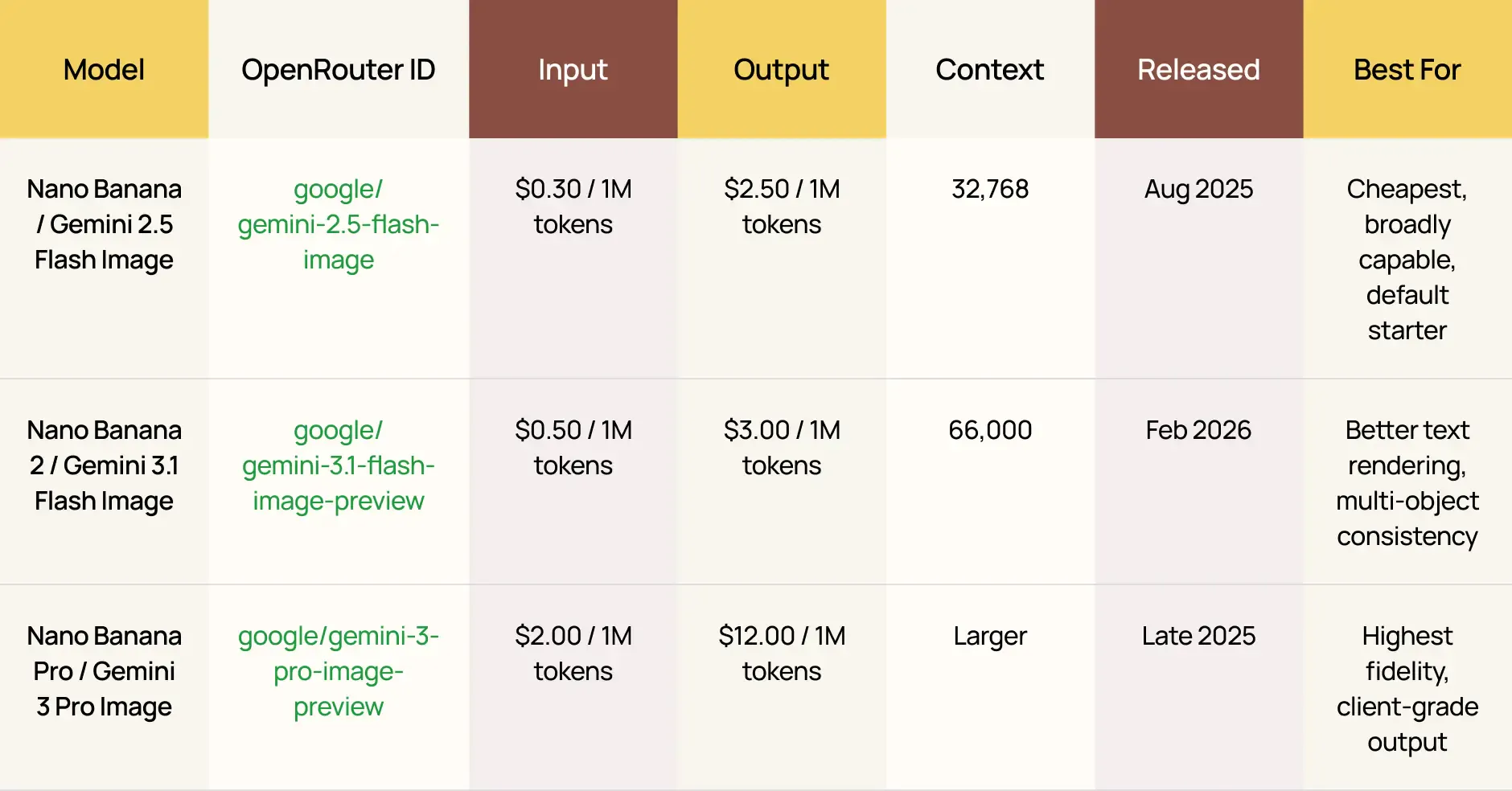
Pricing sourced from OpenRouter's official model pages, including the Gemini 3.1 Flash Image Preview page.
Rough Cost-Per-Image Estimate
Each generated image is roughly 1,290 output tokens.
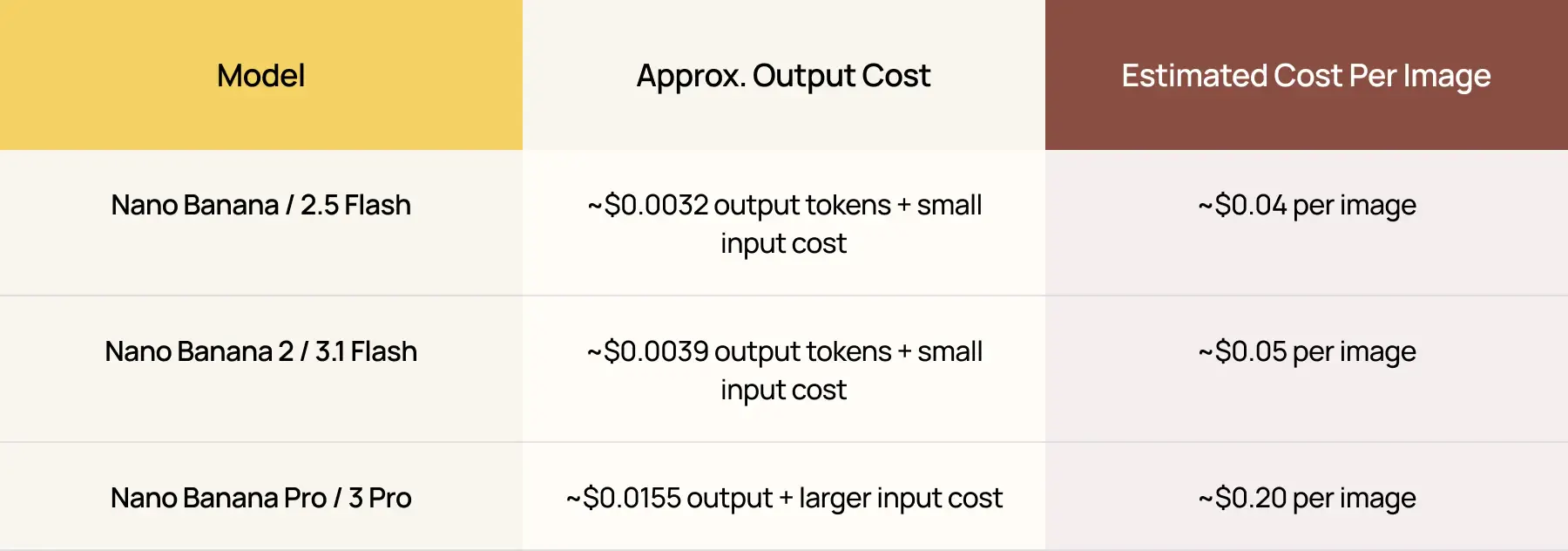
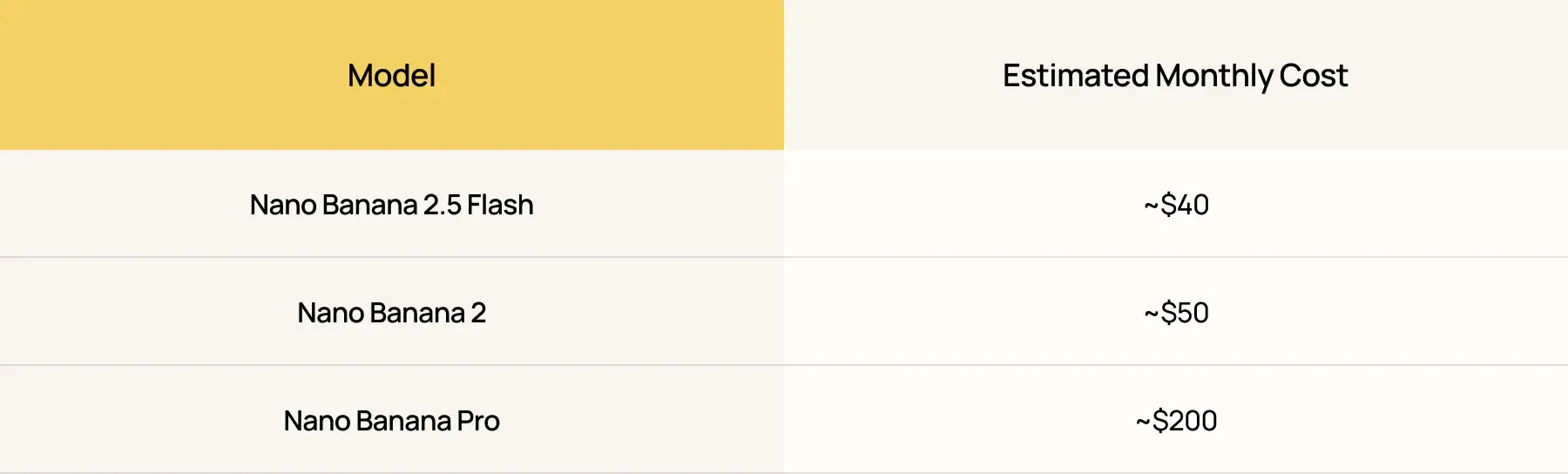
For 1,000 images/month:
Which Nano Banana Model Should You Pick?
Pick the model by your job:
- Default to Nano Banana 2 in 2026. It's the right balance of quality and cost.
- Use Nano Banana 2.5 Flash if you're cost-sensitive and your use case doesn't need v2's text rendering or multi-object consistency.
- Use Nano Banana Pro for client deliverables, hero shots, and anything you'd print at large format.
For a deeper v1 vs v2 comparison for character work, read theNano Banana character consistency guide.
Setup: From Zero to First API Call in 10 Minutes
Step 1 — Create an OpenRouter Account
Go to OpenRouter, sign up with Google or GitHub, and add a payment method.
OpenRouter operates on credit balance. Top up $5 to start.
Step 2 — Generate an API Key
Go to:
Settings → Keys → Create New Key
Save it as an environment variable:
1export OPENROUTER_API_KEY="sk-or-v1-..."Step 3 — Make Your First Call
The simplest possible curl:
1curl https://openrouter.ai/api/v1/chat/completions \
2 -H "Authorization: Bearer $OPENROUTER_API_KEY" \
3 -H "Content-Type: application/json" \
4 -d '{
5   "model": "google/gemini-3.1-flash-image-preview",
6   "messages": [
7     {
8       "role": "user",
9       "content": "Generate an image of a serene mountain lake at sunrise, photorealistic."
10     }
11   ],
12   "modalities": ["image", "text"]
13 }'
The response includes a base64-encoded image in the assistant message. Decode and save it as a PNG.
That’s it. You’ve made your first Nano Banana 2 call.
Working Code: Python
1import os
2import base64
3import requests
4
5API_KEY = os.environ["OPENROUTER_API_KEY"]
6URL = "https://openrouter.ai/api/v1/chat/completions"
7
8def generate_image(prompt, model="google/gemini-3.1-flash-image-preview"):
9   response = requests.post(
10       URL,
11       headers={
12           "Authorization": f"Bearer {API_KEY}",
13           "Content-Type": "application/json",
14           "HTTP-Referer": "https://your-site.com",  # optional, for OpenRouter analytics
15           "X-Title": "Your App Name",                # optional
16       },
17       json={
18           "model": model,
19           "messages": [{"role": "user", "content": prompt}],
20           "modalities": ["image", "text"],
21       },
22       timeout=60,
23   )
24   response.raise_for_status()
25   data = response.json()
26
27   # Extract the image from the message
28   message = data["choices"][0]["message"]
29   if "images" in message:
30       for img in message["images"]:
31           b64 = img["image_url"]["url"].split(",", 1)[1]
32           return base64.b64decode(b64)
33   raise RuntimeError(f"No image in response: {data}")
34
35if __name__ == "__main__":
36   img_bytes = generate_image(
37       "A cozy Scandinavian living room with a cream bouclé sofa, "
38       "brass arc lamp, jute rug. Soft natural light from the left. "
39       "Photorealistic, magazine quality."
40   )
41   with open("output.png", "wb") as f:
42       f.write(img_bytes)
43   print("Saved output.png")
Working Code: Node.js
1import fs from "node:fs";
2
3const API_KEY = process.env.OPENROUTER_API_KEY;
4const URL = "https://openrouter.ai/api/v1/chat/completions";
5
6async function generateImage(prompt, model = "google/gemini-3.1-flash-image-preview") {
7 const response = await fetch(URL, {
8   method: "POST",
9   headers: {
10     Authorization: `Bearer ${API_KEY}`,
11     "Content-Type": "application/json",
12     "HTTP-Referer": "https://your-site.com",
13     "X-Title": "Your App Name",
14   },
15   body: JSON.stringify({
16     model,
17     messages: [{ role: "user", content: prompt }],
18     modalities: ["image", "text"],
19   }),
20 });
21
22 if (!response.ok) {
23   throw new Error(`HTTP ${response.status}: ${await response.text()}`);
24 }
25
26 const data = await response.json();
27 const message = data.choices[0].message;
28 if (message.images && message.images.length > 0) {
29   const dataUrl = message.images[0].image_url.url;
30   const b64 = dataUrl.split(",", 2)[1];
31   return Buffer.from(b64, "base64");
32 }
33 throw new Error("No image in response");
34}
35
36const img = await generateImage(
37 "A cozy Scandinavian living room with a cream bouclé sofa, brass arc lamp, jute rug."
38);
39fs.writeFileSync("output.png", img);
40console.log("Saved output.png");
Working Code: Image-to-Image Editing
The whole point of Nano Banana is editing.
Here’s how to send a reference image:
1import os, base64, requests
2from pathlib import Path
3
4API_KEY = os.environ["OPENROUTER_API_KEY"]
5
6def edit_image(reference_path, prompt, model="google/gemini-3.1-flash-image-preview"):
7   img_bytes = Path(reference_path).read_bytes()
8   b64 = base64.b64encode(img_bytes).decode()
9   data_url = f"data:image/png;base64,{b64}"
10
11   response = requests.post(
12       "https://openrouter.ai/api/v1/chat/completions",
13       headers={"Authorization": f"Bearer {API_KEY}"},
14       json={
15           "model": model,
16           "messages": [{
17               "role": "user",
18               "content": [
19                   {"type": "text", "text": prompt},
20                   {"type": "image_url", "image_url": {"url": data_url}},
21               ],
22           }],
23           "modalities": ["image", "text"],
24       },
25       timeout=60,
26   )
27   response.raise_for_status()
28   data = response.json()
29   message = data["choices"][0]["message"]
30   if "images" in message:
31       return base64.b64decode(message["images"][0]["image_url"]["url"].split(",", 1)[1])
32   raise RuntimeError(f"No image returned: {data}")
33
34if __name__ == "__main__":
35   edited = edit_image(
36       "room.jpg",
37       "Keeping the room layout, window position, and ceiling height the same, "
38       "replace the sofa with a low-profile bouclé sectional in cream. Photorealistic."
39   )
40   Path("edited.png").write_bytes(edited)
This is the workflow that powers:
Rate Limits, Quotas, and Reliability
OpenRouter's rate limits are tied to your account balance, not a fixed quota.
Rate Limit Basics
- Free credits accounts: Very low rate limit, suitable only for testing.
- Paid accounts with $5+ balance: Higher rate limit. The exact cap varies by model.
- Gemini-family models: Routed through Google AI Studio, which enforces its own per-minute and per-day caps.
Practical Advice
- For batch jobs, throttle to around 10 calls/second and back off on 429 responses.
- Catch 503 errors and retry with exponential backoff.
- Gemini occasionally returns transient unavailability.
- Use the provider parameter if you want to force routing through a specific underlying provider.
Example:
1{
2 "model": "google/gemini-3.1-flash-image-preview",
3 "messages": [...],
4 "provider": { "order": ["Google AI Studio"] }
5}
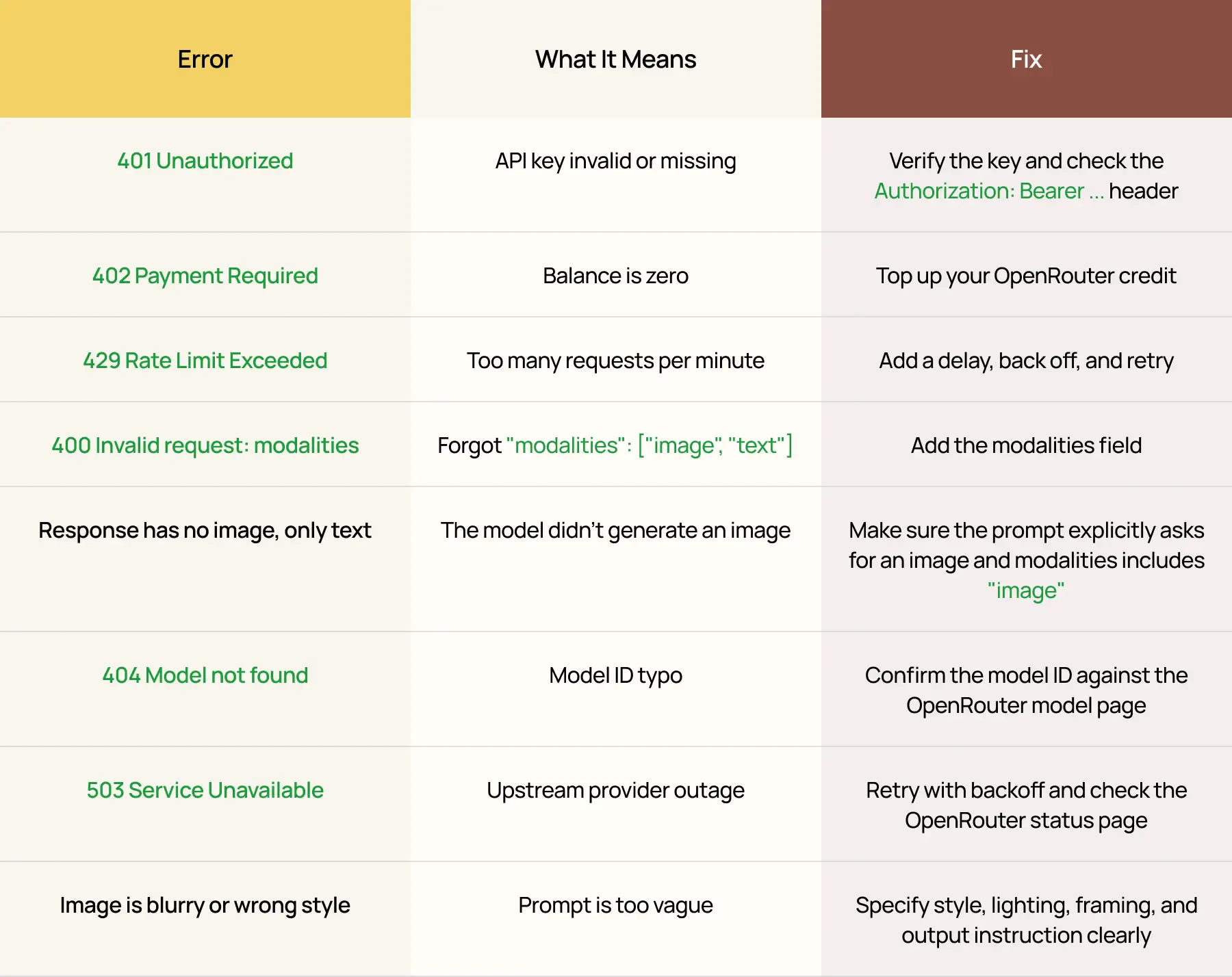
Common Errors and How to Fix Them
Cost Optimization Patterns
If you're running serious volume, these patterns save real money.
1. Cache Aggressively
Identical prompts return effectively identical images, but you still get charged.
If your app generates the same hero image for many users, generate once and serve it from S3.
2. Use Nano Banana 2.5 Flash for Drafts, Pro for Finals
Iterate cheaply. Pay for quality only on the keepers.
A draft-then-final pipeline often runs 5× cheaper than calling Pro for every iteration.
3. Strip Prompts Before Sending
Long, verbose prompts cost real money on the input side.
A 500-word prompt vs a 100-word prompt is a 5× input cost difference.
Tight prompts are also better prompts.
4. Batch Where the SDK Allows It
For workflows that generate the same image in multiple variations, single-call multi-modal requests are sometimes cheaper than N separate requests.
Test this on your specific use case.
5. Pre-Resize Reference Images
Sending a 12-megapixel reference image inflates input token count dramatically.
Resize to 1024×1024 before sending. Quality is identical, cost drops.
OpenRouter vs Direct Google API: When to Switch
Use OpenRouter When
- You're building a prototype or MVP
- You're running fewer than 50,000 calls/month
- You want flexibility to swap models
- You don't want to set up Google Cloud billing
- You need fallback routing for production resilience
Use Direct Google AI Studio or Vertex AI When
- You're running more than 100,000 calls/month and cost matters
- You need data residency in specific regions
- You need enterprise compliance such as HIPAA or SOC 2
- You want to use Google's native batch APIs for bulk jobs
- You're already in the GCP ecosystem
The break-even point on cost is somewhere around 50K–100K calls/month, depending on your model mix.
Frequently Asked Questions
What's the Model ID for Nano Banana 2 on OpenRouter?
The model ID for Nano Banana 2 is:
1google/gemini-3.1-flash-image-previewThe original Nano Banana is:
1google/gemini-2.5-flash-imageNano Banana Pro is:
1google/gemini-3-pro-image-previewHow Much Does Nano Banana Cost on OpenRouter?
Roughly:
- $0.04 per image for the original Nano Banana / 2.5 Flash Image
- $0.05 per image for Nano Banana 2 / 3.1 Flash Image
- $0.20 per image for Nano Banana Pro / 3 Pro Image
You can check live pricing on theOpenRouter Gemini 3.1 Flash Image Preview page.
Can I Use OpenRouter for Free?
OpenRouter gives free credits to new accounts.
That is sufficient for testing, but not enough for production. After that, top up via credit card.
Does Nano Banana on OpenRouter Support Image-to-Image Editing?
Yes.
Pass the reference image as a data:image/png;base64,... URL in a multimodal user message. The code example above shows the full workflow.
Is OpenRouter Cheaper Than Going Direct to Google?
At low volumes, it is roughly equivalent.
At very high volumes, around 100K+ images/month, direct Google API is cheaper.
OpenRouter's value is in flexibility and ease of setup, not absolute cost.
Does OpenRouter Watermark the Images?
No.
The images themselves carry Google's invisibleSynthID watermark, which doesn't affect appearance. OpenRouter adds nothing of its own.
Can I Stream the Response from Nano Banana?
The image is returned in a single chunk after generation.
Meaningful streaming isn't available for image generation in the way it is for text. Set a 60-second timeout and wait.
Is There a Python SDK for OpenRouter?
OpenRouter is compatible with the OpenAI Python SDK.
Point the SDK to:
1OpenAI(
2   base_url="https://openrouter.ai/api/v1",
3   api_key="..."
4)
Then use it normally.
Most LangChain and LlamaIndex integrations work out of the box.
Try the Workflow
The fastest way to learn this is to make the call.
Sign up, top up $5, copy the curl example, swap the prompt, and run it.
Twenty minutes from now you'll have your first generated image and a working API key.
For deeper rabbit holes once you've got the basics, read:
- Character consistency guide for portrait workflows
- Interior design pillar for room-edit pipelines
- Pollo AI review
- Bylo.ai guide
- OpenArt AI review


